Apache Drill is a powerful tool for querying a variety of structured and partially structured data stores, including a number of different types of files. This article describes the use of QuerySurge with Drill for dealing with Apache Parquet files. Because Drill offers strong performance especially with large files, for QuerySurge data testing and verification that involves big files, Drill should be considered.
 Note: You can get the setup basics and background for Apache Drill in our Knowledge Base articles about Drill installation and setup on Windows, or on Linux, and on Drill Storage Plugins.
Drill Configuration for Parquet Files
Storage Plugin Configuration
To read Parquet data using Drill, you'll need to use a file system storage plugin that defines the Parquet format. You can use the dfs storage plugin, which includes the following definition:
"parquet": {
      "type": "parquet"
}, ...
Note: Note that this sample entry in the Storage Plugin JSON terminates with a comma, since it is only one element in a (potentially) long JSON. When you edit Storage Plugin JSON, make sure to conform to proper JSON syntax as you make your changes.
Note: If the plugin is misconfigured for the file, Drill returns an exception.
Note: You can find a more complete listing and discussion of dfs plugin properties here.
Including the above definition within a Storage Plugin other than dfs will allow it to be used for Parquet file handling. Once the Storage Plugin settings have been updated (if necessary), you are ready to create a Connection in QuerySurge to query the file.
QuerySurge and Drill with Parquet Files
Deploy the Drill JDBC Driver
Make sure that you've deployed the Apache Drill JDBC driver to your QuerySurge Agents. See the Deploy the Drill JDBC Driver discussion in either of the installation articles (Windows or Linux articles) for instructions if you haven't deployed the driver yet.
Create a QuerySurge Connection to Drill
To create a new Drill Connection in QuerySurge, use the Connection Extensibility feature of the Connection Wizard. You can find a description of how to use Extensibility in this article.
There are a couple of ways to set up a QuerySurge Connection for Drill, depending on whether you want to specify the Storage Plugin on the Connection in the JDBC URL or in your SQL (see this article about Storage Plugins for more details):
Specify the Storage Plugin in the JDBC URL
To specify the Storage plugin in the JDBC URL, use the following syntax:
jdbc:drill:schema=dfs;drillbit=<server-or-IP>:<port>
Note: In this case, your query specifies only the file path: SELECT ... FROM `/drill/sample-data/region.parquet`;
Specify the Storage Plugin in your SQL Query
To specify the Storage plugin in the SQL, use the following URL syntax (which omits the schema):
jdbc:drill:drillbit=<server-or-IP>:<port>
Note: In this case, your query specifies both the Storage Plugin and the file path: SELECT ... FROM dfs.`/drill/sample-data/region.parquet`;
Querying Parquet Files with Drill
For this example we'll use the region.parquet file provided by Drill as sample data during installation. The file is located in the following path:
C:\drill\sample-data\region.parquet (Windows)
/opt/drill/sample-data/region.parquet (Linux)
Using ANSI SQL syntax standards, we can create a QueryPair that retrieves all fields within the Parquet file:
SELECT * FROM `/drill/sample-data/region.parquet`;
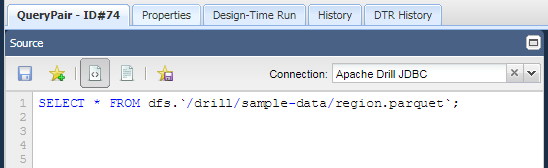
Note: In the FROM clause of your SELECT statement, the path to the file is always relative to the root location property. The root location property is defined in the storage plugin. So, if the root location is /files, then SELECT * FROM `/data/myfile.parquet` refers to a file at: /files/data/myfile.parquet.
 Note: You can find the full documentation for the Drill SQL dialect in the Drill SQL Reference. Specifics for querying a filesystem are found in this discussion.
SQL Data Types to Parquet Types
Out of the box, Drill translates standard SQL data types to native Parquet data types behind the scenes. The following is a list of SQL datatypes and their Parquet counterparts:
| SQL Type | Parquet Type | Description |
| BIGINT | INT64 | 8-byte signed integer |
| BOOLEAN | BOOLEAN | TRUE (1) or FALSE (0) |
| FLOAT | FLOAT | 4-byte single precision floating point number |
| DOUBLE | DOUBLE | 8-byte double precision floating point number |
| INTEGER | INT32 | 4-byte signed integer |
| VARBINARY | INT96 | 12-byte signed integer |
| VARCHAR | VARCHAR | Arbitrarily long character string |
Note: Check out the Drill Parquet Format documentation for more information on Parquet datatype handling.
Note: If you have parquet columns that are displaying as clob or hex fields i.e.(00 d8 a0 52 dc 3e 00 00 b1 6f 25 00), you will need to modify the Drill\conf\drill-override.conf file to include
options: {
store.parquet.reader.int96_as_timestamp: true
}
within the drill.exec: function and restart drill.
Querying Parquet files in HDFS
Apache Drill can access and query flat files located in HDFS using the dfs Storage Plugin. With regard to the Parquet format, if you query a directory, Drill will merge the results from all of its files into one result set. In order to query an individual parquet file in a specified directory, the user under which the drillbit is running must have "execute" rights to it. These rights can be assigned either by changing the file's permission settings or via User Impersonation.