Versions:6.3+
With QuerySurge 6.3, a QuerySurge-specific Excel JDBC driver has been released for our users who, as part of their data testing, use Excel files as QueryPair Sources and/or Targets. This driver uses a standard all-Java JDBC-based approach for connecting to Excel files, in contrast to QuerySurge's original approach, which used Java's builtin ODBC/JDBC bridge to connect to Excel files through Microsoft's Excel ODBC driver. With Java 8, the builtin ODBC/JDBC bridge is no longer part of Java, so we are providing the new Excel JDBC Driver as part of QuerySurge, as a replacement.
What are the advantages of QuerySurge's new Excel JDBC Driver?
- Standard SQL Syntax
You can write your Excel queries in a standard SQL syntax for greater flexibility and ease of maintenance. Our Excel JDBC driver uses the H2 SQL grammar and functions. - Your Excel queries can run faster!
We compared the original-type ODBC/JDBC-bridge-based connection to connections using our new Excel JDBC driver on Excel files with 10 columns of data and a variable number of rows (10K, 50K, 100K, 300K, 500K rows). The timing results are shown in the following graph (Figure 1).
Figure 1. Excel QueryPair Duration (sec): JDBC/ODBC bridge vs. QuerySurge Excel JDBC Driver
Runtime test setup: Win 2008 R2 VM, 32 GB RAM, 3.5 GHz clock, 8 GB App server JVM Heap, 6 GB Agent JVM Heap, Agent query threads: 1, Agent Message Size: 3 MB, both Source and Target queries in QueryPair hit the same Excel file with the same query. All data types are string types for all columns. Each measurement is an average of 3 runs. Data points cover the standard deviation (along the y-axis) of each measurement.
As is apparent from the QueryPair timings shown in Figure 1, for small Excel files (50K rows or less), the drivers are nearly the same. As the number of rows increases, the timing for the original ODBC driver setup increases quadratically with increasing row count, while the new Excel JDBC Driver timing increases linearly. In our final measurement (500K rows), our new Excel JDBC Driver runs approximately 13x faster than the old ODBC-based setup. - Your Excel queries use less CPU
As above, we compared the original-type connection to connections using our new Excel JDBC driver on Excel files with 10 columns of data and a variable number of rows (10K, 50K, 100K, 300K, 500K rows). The CPU results are shown in the following graph (Figure 2).
Figure 2. Excel QueryPair CPU usage (GHz): JDBC/ODBC bridge vs. QuerySurge Excel JDBC Driver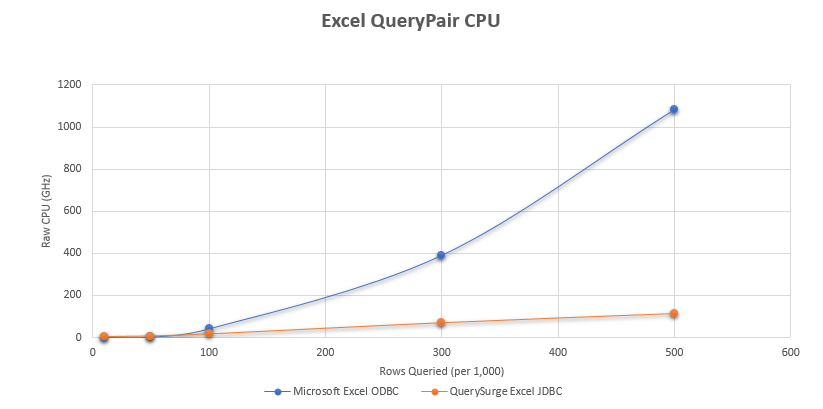
Runtime test setup: Win 2008 R2 VM, 32 GB RAM, 3.5 GHz clock, 8 GB App server JVM Heap, 6 GB Agent JVM Heap, Agent query threads: 1, Agent Message Size: 3 MB, both Source and Target queries in QueryPair hit the same Excel file with the same query. All data types are string types for all columns. Each measurement is an average of 3 runs. Data points cover the standard deviation (along the y-axis) of each measurement. QueryPair GHz calculated for each run by summing the CPU % for the Agent process (captured with Microsoft Perfmon) for all timepoints and multiplying by the clock speed.
Looking at CPU for each of the runs, conducted for these trials in the same way as were the QueryPair timings, we see a similar pattern. The lower row-count Excel files show very similar results, with a (roughly) quadratic increase for the Excel ODBC driver setup as row counts increase. The CPU increase for the new Excel JDBC Driver is nearly linear, again. Similar to (2) above, our final measurement (500K rows), the new Excel JDBC Driver consumes just under 10% of the CPU than the old ODBC-based setup. - Native Excel data types
Our new Excel JDBC Driver offers two data-type options:
a) You can run your tests with all of the Excel data considered to be string (i.e. varchar) data;
b) You can run your tests mapping the Excel data types to standard database types; the following table shows the mappings.
Excel Data Type QuerySurge Data Type 1 General VARCHAR 2 Number DECIMAL 3 Currency DECIMAL 4 Accounting DECIMAL 5 Date TIMESTAMP 6 Time TIMESTAMP 7 Percentage DECIMAL 8 Fraction DECIMAL 9 Scientific DECIMAL 10 Text VARCHAR - Excel files on Linux (!)
For those of you (and we know you’re out there!) who want to deploy QuerySurge Agent(s) on Linux and query Excel files on Linux, you can do this simply, because the QuerySurge Excel JDBC Driver supports this use case. Because QuerySurge's Excel JDBC Driver is an all-Java driver, it runs on non-Windows Operating Systems. Your Excel files can be read and queried by the driver normally. - Goodbye, Excel ODBC Drivers
Just to make sure that we're clear about this, you won’t have to deploy an Excel ODBC driver or Microsoft Office to any Agents – because our new Excel JDBC Driver doesn’t use it. All you need is our Excel JDBC Driver, and you can query your Excel files. Oh, and because we know there are legacy systems with legacy files are out there, the Driver supports both Excel 2003 files and Excel 2007+ files.
What are the disadvantages of QuerySurge's new Excel JDBC Driver?
If you're just starting out with QuerySurge and Excel, there are no disadvantages! Just configure a connection (see how here) and then start to experiment with SQL (see how here).
If you already have queries against Excel, then we recommend converting your existing queries over to the new driver. The size of this task depends on the number of queries you have and their complexity. See our FAQ for more details.